



In-App Purchase trong Flutter (Android): Hướng dẫn chi tiết & Tích hợp Offer Codes
Tổng quan về hệ thống thanh toán In-app (IAP)
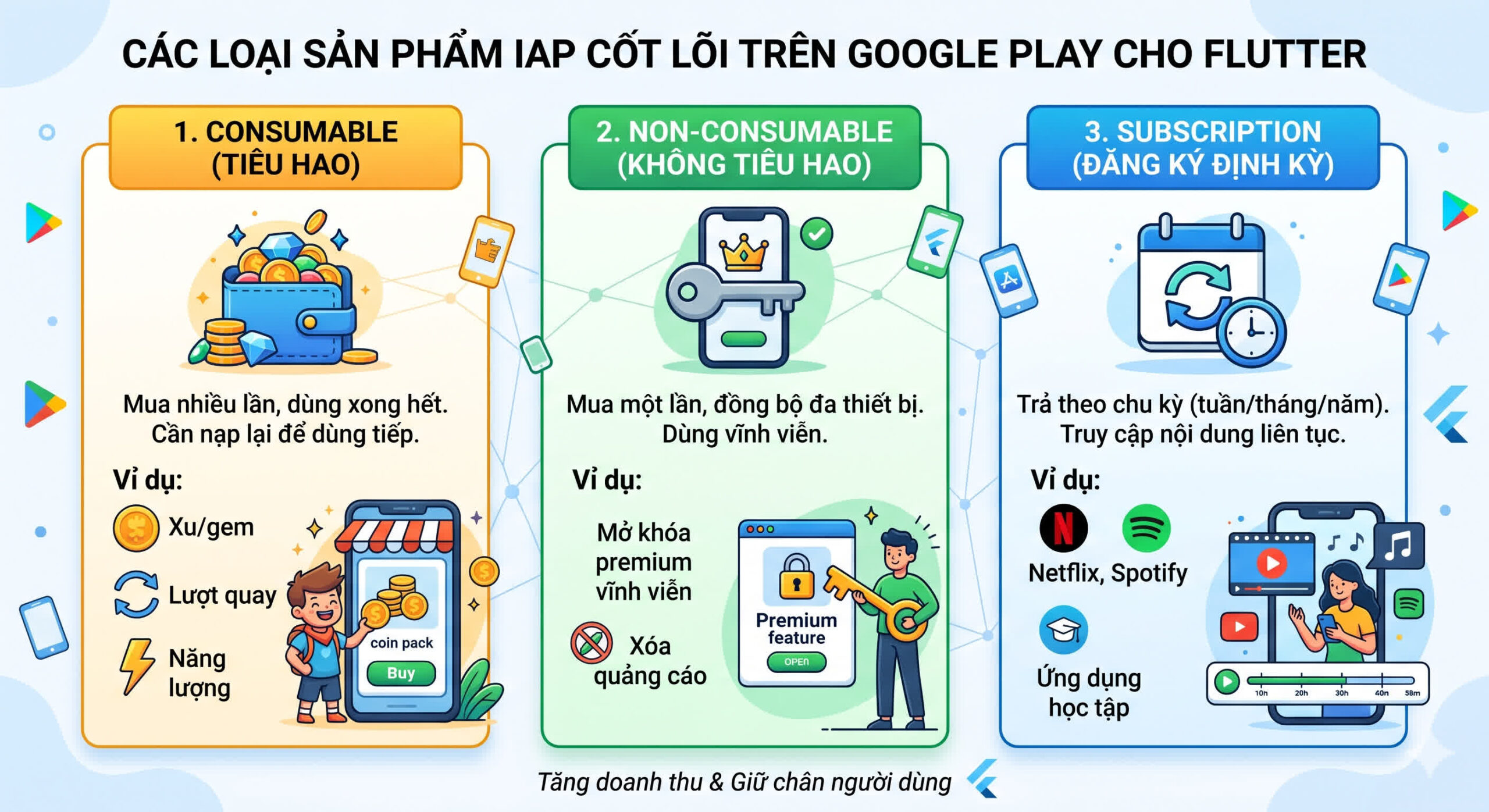
In-App Purchase (IAP) không chỉ là nguồn thu chính của nhiều ứng dụng di động mà còn là công cụ giữ chân người dùng hiệu quả. Nếu bạn đang xây dựng ứng dụng Flutter và muốn tích hợp thanh toán trên Google Play, bạn cần nắm rõ ba loại sản phẩm cốt lõi:
Cài đặt plugin in_app_purchase
Plugin chính thống và được khuyến nghị là in_app_purchase.
-
Thêm dependency vào
pubspec.yaml:dependencies: flutter: sdk: flutter in_app_purchase: ^3.3.0 # Luôn dùng version mới nhất -
Chạy
flutter pub get -
Import thư viện:
import 'package:in_app_purchase/in_app_purchase.dart'; import 'package:in_app_purchase_android/in_app_purchase_android.dart'; import 'package:flutter/foundation.dart' show defaultTargetPlatform, TargetPlatform; -
Kích hoạt giao dịch chờ (Pending Purchases) cho Android – bước bắt buộc, đặt ngay trong
main():void main() { if (defaultTargetPlatform == TargetPlatform.android) { InAppPurchaseAndroidPlatformAddition.enablePendingPurchases(); } runApp(MyApp()); }⚡ Quan trọng: Nếu quên bước này, ứng dụng sẽ báo lỗi ngay khi khởi tạo
InAppPurchase.
Lấy danh sách sản phẩm từ Google Play
final InAppPurchase _inAppPurchase = InAppPurchase.instance;
Set
<String> _productIds = {'premium_monthly', 'remove_ads'};

Future
<void> loadProducts() async {
  final bool isAvailable = await _inAppPurchase.isAvailable();
  if (!isAvailable) return;

  final ProductDetailsResponse response =
      await _inAppPurchase.queryProductDetails(_productIds);

  if (response.notFoundIDs.isNotEmpty) {
    print('Không tìm thấy sản phẩm: ${response.notFoundIDs}');
  }

  setState(() {
    _products = response.productDetails;
  });
}
Xử lý luồng thanh toán – Trái tim của IAP
Bạn phải lắng nghe purchaseStream ngay khi ứng dụng khởi động để bắt kịp các giao dịch chưa hoàn tất.
class _MyHomePageState extends State
<MyHomePage> {
  StreamSubscription<List<PurchaseDetails>>? _subscription;
  final InAppPurchase _inAppPurchase = InAppPurchase.instance;

  @override
  void initState() {
    super.initState();
    _subscription = _inAppPurchase.purchaseStream.listen(
      (events) async => await _handlePurchaseUpdates(events),
    );
  }

  @override
  void dispose() {
    _subscription?.cancel();
    super.dispose();
  }

  Future
<void> _handlePurchaseUpdates(List<PurchaseDetails> purchases) async {
    for (final detail in purchases) {
      switch (detail.status) {
        case PurchaseStatus.purchased:
        case PurchaseStatus.restored:
          await _handleValidPurchase(detail);
          break;
        case PurchaseStatus.error:
          _handleError(detail.error!);
          if (detail.pendingCompletePurchase) {
            await _inAppPurchase.completePurchase(detail);
          }
          break;
        case PurchaseStatus.pending:
          // Giao dịch đang chờ (mạng yếu, cần thao tác thêm)
          break;
        case PurchaseStatus.canceled:
          // Người dùng hủy
          break;
      }
    }
  }

  void _buyProduct(ProductDetails product) {
    final param = PurchaseParam(productDetails: product);
    // Phân biệt loại sản phẩm
    switch (product.type) {
      case ProductType.consumable:
        _inAppPurchase.buyConsumable(purchaseParam: param);
        break;
      case ProductType.nonConsumable:
        _inAppPurchase.buyNonConsumable(purchaseParam: param);
        break;
      case ProductType.subscription:
        _inAppPurchase.buySubscription(purchaseParam: param);
        break;
    }
  }
}
Xác thực giao dịch phía Server (Bắt buộc)
Tuyệt đối không xác thực hoàn toàn ở client – thiết bị jailbreak/root có thể giả mạo.
Future
<void> _handleValidPurchase(PurchaseDetails detail) async {
  final verificationData = detail.verificationData.serverVerificationData;

  // Gửi lên backend của bạn
  final isValid = await backendApi.verifyReceipt(verificationData);

  if (isValid) {
    await backendApi.grantPremiumAccess(userId, detail.productID);

    // BẮT BUỘC: Hoàn tất giao dịch với Google Play
    if (detail.pendingCompletePurchase) {
      await _inAppPurchase.completePurchase(detail);
    }

    setState(() => _isPremium = true);
  } else {
    _showError('Xác thực thất bại, vui lòng liên hệ hỗ trợ.');
  }
}
Lỗi thường gặp – Cực kỳ nguy hiểm nếu bỏ qua
❌ Quên gọi completePurchase()
- Hậu quả: Google Play không nhận được xác nhận → tự động hoàn tiền cho người dùng sau 3 ngày (production) hoặc 5 phút (sandbox). Bạn mất tiền, họ vẫn dùng premium.
- Khắc phục: Luôn gọi
completePurchase()sau khi xác thực thành công, như code ở trên.
❌ Không kiểm tra pendingCompletePurchase
- Sai: Gọi
completePurchase()khi cờ nàyfalsesẽ gây exception. - Đúng: Chỉ gọi khi
detail.pendingCompletePurchase == true.
Best Practices dành cho Android
- Luôn xác thực qua server – không bao giờ tin client.
- Xử lý giao dịch pending – lưu vào local queue nếu mất mạng, thử lại sau.
- Test kỹ trên môi trường sandbox – dùng tài khoản license tester.
- Cập nhật plugin thường xuyên – theo dõi changelog trên pub.dev.
- Cung cấp nút “Khôi phục giao dịch”:
Future
<void> restore() async {
  await _inAppPurchase.restorePurchases();
}
Tính năng nâng cao: Offer Codes (Promo Codes) trên Android
Offer Codes giúp bạn tạo các chiến dịch marketing mục tiêu (tặng mã cho cộng tác viên, khách hàng thân thiết, giveaway).
🔧 Cấu hình trên Google Play Console
- Vào Google Play Console → chọn ứng dụng.
- Điều hướng: Monetize with Play → Products → Promotions.
- Create Promotion → chọn loại sản phẩm (Managed product hoặc Subscription).
- Thiết lập số lượng code, ngày hết hạn, mức giảm giá (miễn phí hoặc giảm %).
- Tải file code hoặc tạo code thủ công.
📱 Cách người dùng nhập mã
Lưu ý quan trọng: Mã khuyến mại được nhập TRONG GIAO DIỆN CỦA GOOGLE PLAY STORE, không phải trong ứng dụng của bạn.
- Người dùng mở Google Play → nhấn vào biểu tượng thanh toán → chọn “Redeem code” → nhập mã.
- Sau khi nhập thành công, ứng dụng của bạn nhận được một
PurchaseDetailshoàn toàn bình thường (y hệt giao dịch bằng tiền thật). - Không cần code đặc biệt để xử lý – luồng IAP chuẩn vẫn hoạt động.
Nếu bạn muốn sử dụng trực tiếp redeem code từ trong ứng dụng Flutter (tính năng nâng cao), có thể dùng in_app_purchase_android:
API này tương đối mới, hãy kiểm tra tài liệu cập nhật trên pub.dev.
FAQ
1. Tại sao không thấy sản phẩm trong ứng dụng?
- Sai Product ID – so sánh với ID trên Google Play Console.
- Sản phẩm chưa active – trạng thái phải là “Active”.
- Chưa ký “Paid Applications Agreement” – vào Play Console → Settings → Account details.
- Tài khoản test chưa được thêm – thêm email vào danh sách “License testers”.
- Cache của Store – xóa dữ liệu ứng dụng hoặc cài lại.
2. Test IAP mà không mất tiền thật?
- Dùng License Testing – thêm email test vào danh sách license tester. Mọi giao dịch sẽ mô phỏng, không trừ tiền.
Kết luận
Tích hợp In-App Purchase trong Flutter cho Android đòi hỏi sự cẩn trọng: lắng nghe luồng giao dịch, xác thực receipt qua server, luôn gọi completePurchase() để tránh mất tiền. Đặc biệt, Offer Codes (Promo Codes) mở ra cánh cửa marketing hiệu quả. Áp dụng đúng best practices, bạn sẽ có hệ thống thanh toán an toàn, chuyên nghiệp.